FolderVideoPlayer

The whole folder plays.

The free Mac app plays a folder, helps you tag and tidy a big library, and saves it all to your share, so your Apple TV sees it too.

Free · macOS 14 or later · Signed and notarized by Apple

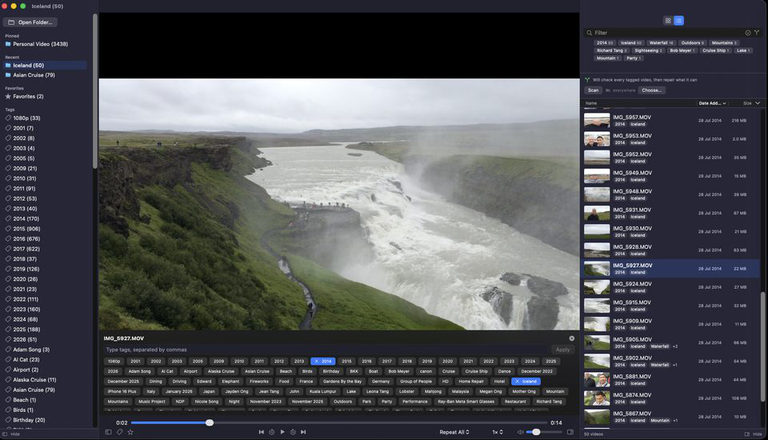
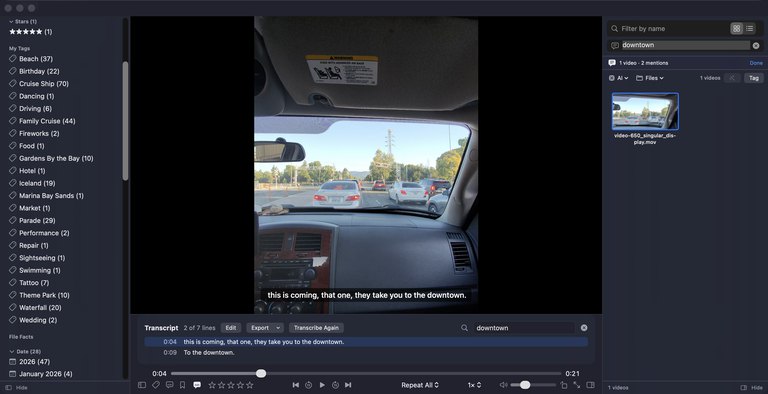
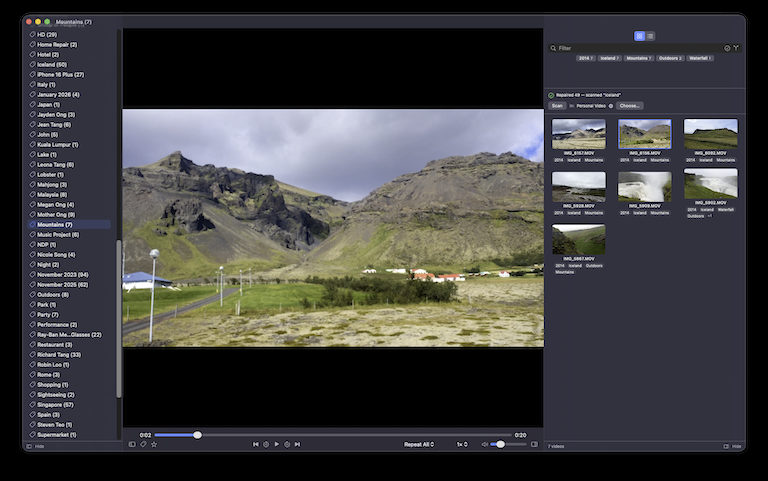
FolderVideoPlayer for Mac: the tag sidebar, the video playing, and the folder's videos shown as poster frames with their names

Tag it while it plays

Press T and the tag panel opens under the picture. The video waits while you type, and each tag applies the moment you enter it. No save step. Esc closes it.

Tags are saved to the .FolderVideoPlayer folder on your share, so the Apple TV and any other Mac see them too.

The Mac tag panel open under the picture, with the tags 2014, Iceland and Waterfall applied

Built for big libraries

The folder is the playlist

Drop a folder on the window or press O. Every video plays in order, subfolders included, and each remembers where you stopped. QuickTime can’t even queue two.

Tags from what’s already true

Suggestions from your folder names, the date it was shot, the camera, the quality (4K, 720p, Slow-mo) and the place for clips with GPS. You see them before they’re applied.

Find duplicates, safely

Videos are fingerprinted as you watch. Copies are grouped with the keeper chosen and the reason shown. Tags move to the copy you keep, and nothing is deleted: extras go to the Trash or a folder you pick.

Thumbnails for every screen

The Mac writes poster frames to the share once. The Apple TV reads them instead of making its own over Wi-Fi, so browsing on the TV is instant.

AI that learns your library — on your Mac

Optional add-ons, run with Apple’s Core ML on your own Mac. No server, no account, no upload, nothing extra to install.

Suggests tags, then learns

Accept a suggestion or reject it with ✕. Once a tag has four examples of what it is and four of what it isn’t, you can train it to your own taste.

Find more like this

Turn on Look-alikes for a tag and the app searches the rest of the library for videos that look like the ones you’ve tagged, each shown with a frame before you accept it.

People, by face

Name a face once and it finds that person across the library. Off until you switch it on; faces never leave the Mac.

Safe / not-safe

Marks adult content and corrects itself from your own marks. Useful when a family archive shares a drive with everything else. The verdict stays in your profile.

Download only what you use

None of the AI ships in the app. Playing, tags, stars and the duplicate finder work straight away; turn on add-ons in Settings → AI.

Each download is checked against its published SHA-256 before it’s installed. The tag model is SigLIP 2 B/16, Apache-2.0 end to end, and Settings → AI names every model file in use. Each tag profile keeps its own training, marks and people, and hidden videos are left out of all of it.

Add-onWhat it gives youSize
Tag suggestionsSuggested tags, look-alikes and trained tags≈171 MB
Safe / not-safeThe adult-content verdict≈159 MB
Face recognitionFinding faces and the people you name≈18 MB

Free, with nothing to sign up for

No account, no ads, nothing uploaded. Drag the app to Applications and open a folder.